How to check the Porsche PT3G VCI STATUS LEDs
How to check the Porsche PT3G VCI STATUS LEDs
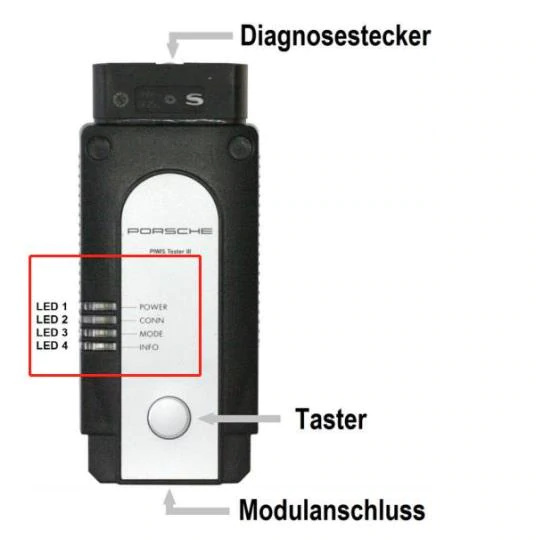
POWER
CONN
MODE
INFO
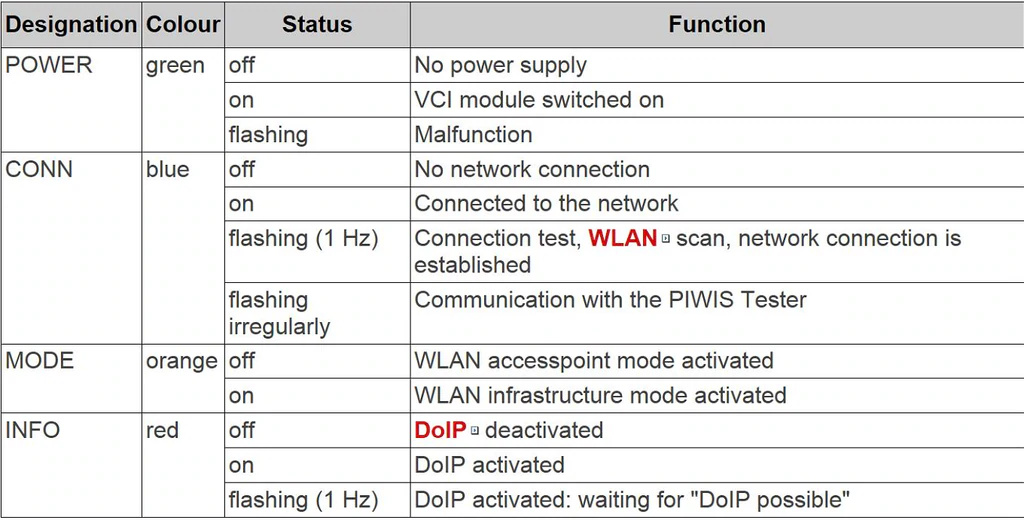
How to check Porsche VCI STATUS LEDS
The PT3G-VCI has 4 LEDs each on the top and bottom of the diagnostic interface, each
this 4 LED has a different color. These 4 LEDs signal relevant information about the status
of the PT3G-VCI.
The LEDs of the PT3G-VCI also show the following special animations:
1.In rescue mode, all 4 LEDs flash simultaneously.
2.In the case of a software update
LED / Status
1.Power LED,green
LED on: power is on;
LED flashing 1HZ: communication error
2.CONN LED blue, communication
LED light on: communication has been established;
LED light flashes 1HZ: communication has been connected
LED light flashes: data is being transmitted
3.mode LED, orange WLAN
LED on: WLAN infrastructure mode
LED flashing: WLAN module error
LED off: WLAN direct connection mode (access point mode)
4.info LED, red, DOIP activation
LED on: DoIP and PT3G-VCI are enabled, and the vehicle diagnostic box or base station is connected;
LED flashing: DoIP is enabled, PT3G-VCI only connects to the diagnostic equipment through the USB module, not to the vehicle diagnostic box or base station;
LED off: DOIP is not activated.

Comments
Post a Comment